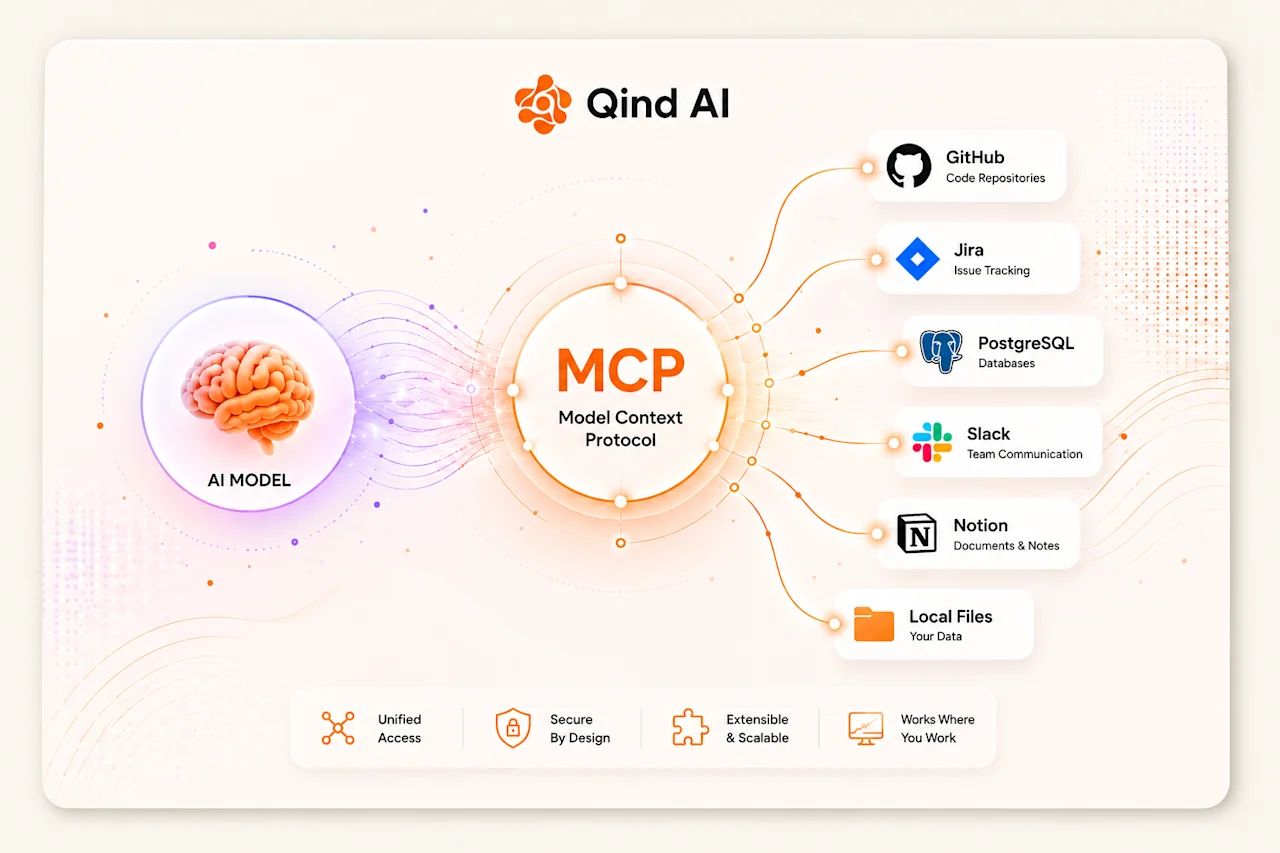
To explain it at a very simple level: MCP is an open protocol that enables AI models to communicate with external systems in a standardized way. In other words, if you want an AI model to connect to Jira, retrieve data from GitHub, query a database, or access documents within your company, you usually need to build a separate integration for each system. This increases development costs and creates compatibility issues between different tools.
MCP was created to solve this problem.
What Does MCP Do?
We can think of MCP as a common connection language for AI systems.
Just as the USB standard allows us to connect different devices to a computer, MCP provides a common standard that enables AI models to connect to different data sources and tools.
How Does MCP Work?
For example, an AI assistant may need to:
Review pull requests on GitHub,
List tickets in Jira,
Retrieve data from a SQL database,
Read documents from a file system,
Work with internal company applications.
When you told a large language model, "Review the code in this GitHub repository, compare it with the latest user data in the database, and send a summary to the team on Slack," the process would often get stuck. You either had to build numerous bridge APIs and integrations or manually copy and paste data from one place to another.
We can compare this to the USB revolution in computer history. Before USB became part of our lives, connecting a keyboard, mouse, printer, or external drive required device-specific cables and connectors. USB arrived and connected everything through a single port.
MCP is doing exactly the same thing for the world of AI.
How Does the Architecture Work?
Behind the scenes, the system is based on a simple Client-Server architecture that is already familiar from the web world:
Host: The main application where you run the AI. (For example, Cursor, VS Code, or any desktop interface you use.)
Client: The protocol component on the model side. It determines what the model needs at a given moment.
Server: The actual source of the data or tool you want to use. This could be your GitHub repository, PostgreSQL database, local folders on your computer, or your Notion pages.
When you give a task to the AI, the model connects to the MCP server, securely retrieves only the data (context) required for that specific task, processes it, and returns a clean result.
Why Is It Important and What Benefits Does It Provide?
If you work with code, data, or digital tools every day, the practical benefits of MCP are quite clear:
Data Silos Are Reduced
Documents may be stored in Notion, code in GitHub, and logs in a database. With MCP, an AI can access all these different sources at the same time and work by correlating the information between them.
Security Boundaries Remain Under Your Control
You do not need to upload company data or personal files to remote AI cloud servers. The MCP server runs within your own environment. The model can access only the folders or data you explicitly allow, and only during the execution of the task.
No More Constantly Building Connectors
In the past, whenever a new AI tool appeared, you had to spend days integrating it with your own systems. Now, once you set up an MCP Server, it can communicate directly with all compatible models on the market.
A Small Example
Let's say we are trying to fix a software bug.
With the old approach, we would copy the error from the terminal, paste it into an AI tool, take the generated code, find the relevant file in our editor, apply the changes, and run the tests again manually.
In an editor with MCP integration, you can simply tell the AI, "Check the error in the terminal and fix it." The model reads the terminal logs directly, finds the relevant file in the project, updates the code, runs the tests locally, and shows you the result.
In Summary
MCP transforms AI from being just an intelligent chat interface that answers questions into a real assistant that can use tools, read files, and automate workflows.
It is not difficult to imagine a future where many of the software applications and databases we use come with built-in MCP support.