Notion has become one of the most recognizable tools for notes, databases, wikis, project tracking, and team knowledge. That flexibility is exactly why so many people use it, but it is also why finding a good alternative is harder than it sounds. When someone searches for a “Notion alternative,” they may be looking for a better writing experience, stronger databases, more privacy, local-first storage, easier knowledge retrieval, or simply something that feels less complex.
That means there is no single tool that can honestly be called the best Notion replacement for everyone. The better question is not “Which app is better than Notion?” It is “What were you actually using Notion for?”
If you mostly use Notion as a personal knowledge base, your ideal alternative will be very different from someone who depends on relational databases and automations. If you use it for collaborative documents, your priorities will be different again. And if your main problem is that useful information disappears inside pages and folders, you may not need another all-purpose workspace at all.
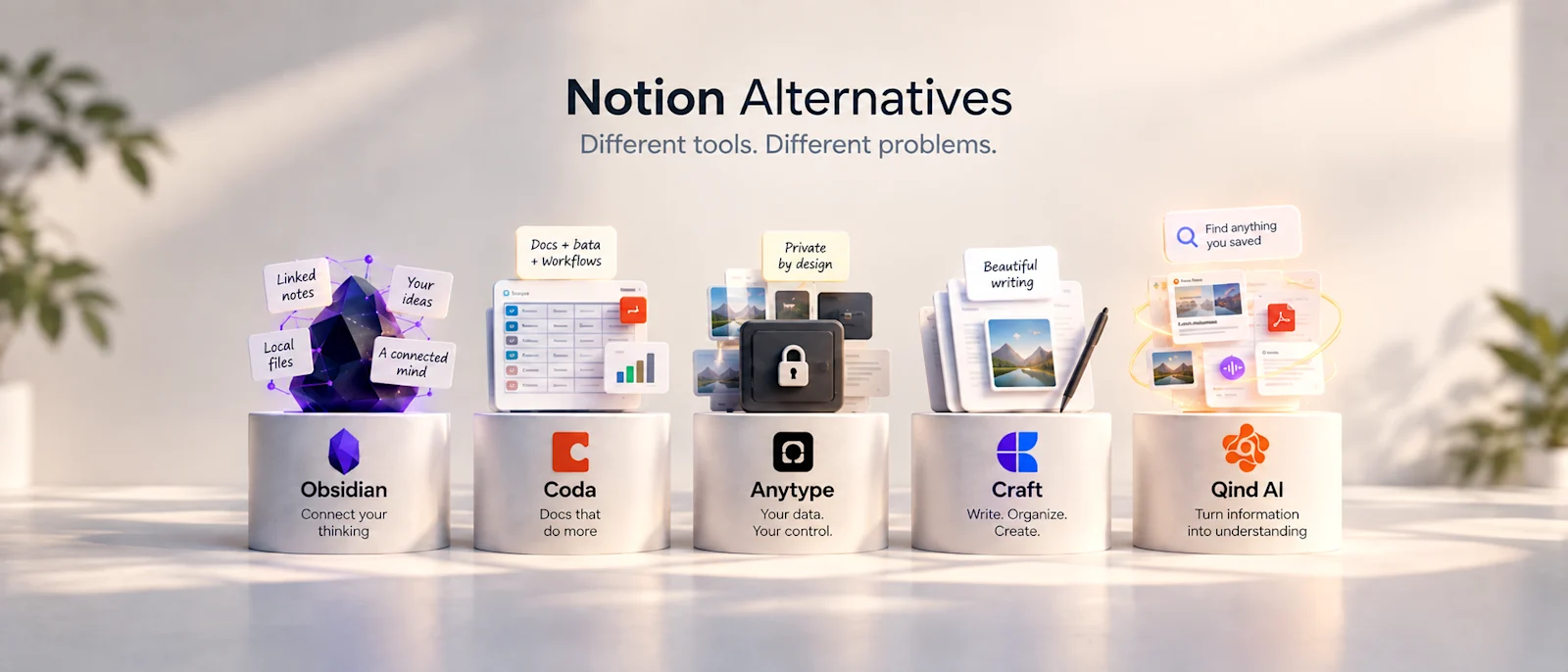
With that in mind, here are five strong Notion alternatives in 2026, each suited to a different kind of user.
1. Obsidian — Best for Personal Knowledge and Local Files
Obsidian is one of the clearest alternatives for people who primarily use Notion as a personal knowledge base. Instead of treating your notes as content stored inside a proprietary workspace, Obsidian uses Markdown files as its primary note format. Those files live in your vault and can be managed directly through your computer's file system, which gives you much more direct control over the underlying data. Obsidian
That approach appeals to users who care about portability, long-term ownership, and building a personal knowledge system around linked notes. Obsidian is particularly strong when your goal is to connect ideas over time rather than build a highly structured team workspace. It can start as a simple note-taking app and become much more sophisticated through plugins and custom workflows.
The trade-off is that this flexibility can require more setup and personal maintenance. If you enjoy designing your own knowledge system, that may be a benefit rather than a disadvantage. If you want the system to organize more of the information for you automatically, Obsidian can feel like another environment that needs to be managed.
Who is it best for? People who want a personal knowledge base, prefer local files, enjoy linked notes, and care about having direct control over how their information is stored.
2. Coda — Best for Structured Data and Powerful Workflows
If the part of Notion you rely on most is databases, structured information, formulas, and workflow logic, Coda is one of the more natural alternatives to consider. Coda combines documents with connected tables, and those tables can represent everything from tasks and customers to projects, inventory, or internal processes. Its official documentation describes tables as one of the platform's central building blocks, with data that can be referenced, analyzed, summarized, and displayed in different views. Coda
Coda becomes especially interesting when your workspace starts behaving less like a notebook and more like an application. Its formula language can be used across tables, buttons, controls, and automations, while built-in automation rules can respond to changes, schedules, forms, and other triggers. Coda
That makes it a strong choice for teams that want documents and operational workflows to live close together. You can build systems around product planning, operations, team processes, project tracking, or internal tools without separating every workflow into a different application.
The trade-off is similar to Notion in one important respect: powerful systems can become complex systems. If all you really wanted was a quiet place to write notes and remember useful ideas, Coda may give you far more machinery than you need.
Who is it best for? Teams and individuals who depend heavily on databases, formulas, structured workflows, and process automation.
3. Anytype — Best for Privacy and Local-First Knowledge
For some users, the biggest question is not features. It is ownership.
Anytype takes a local-first approach and has put privacy, user-controlled keys, offline functionality, and encrypted data at the center of its architecture. The company describes its system as based on encrypted, local-first vaults, with collaboration designed to work even when users disconnect from the internet. Anytype Blog
That makes Anytype interesting for people who like the idea of a structured workspace but do not want their personal knowledge system to depend entirely on a traditional cloud model. It can be particularly appealing if you want to build notes, collections, relationships, and structured information while keeping data ownership as a first-class concern.
It also represents a broader philosophical alternative to Notion. Rather than simply asking how to build a more flexible workspace, Anytype asks what a modern knowledge system should look like when local ownership and privacy are part of the foundation.
The trade-off is that users moving from a mature all-purpose workspace may need to adjust to a different mental model and ecosystem. Choosing Anytype makes the most sense when local-first architecture and autonomy are meaningful requirements, rather than just nice-to-have features.
Who is it best for? Privacy-conscious users who want a local-first knowledge environment and greater control over their data.
4. Craft — Best for Writing, Notes, and a Cleaner Experience
Not everyone needs a workspace that can become a database, project manager, wiki, CRM, and internal application at the same time. Sometimes you just want a place where writing feels good.
That is where Craft stands out.
Craft centers its experience around notes, documents, tasks, calendars, whiteboards, and daily notes, while putting a strong emphasis on writing and presentation. Its current product pages highlight cross-device writing, document sharing, tasks integrated directly into documents, and tools for turning quick notes into polished content. Craft Docs
It also supports offline work, cross-device sync, collaboration, AI-assisted writing, and integrations through APIs and MCP connections. Craft Docs That gives it enough depth for serious everyday use without making the interface feel primarily like a database builder.
If your frustration with Notion is that you spend too much time building systems instead of writing inside them, Craft can feel refreshingly direct. It is particularly attractive for writers, creators, students, consultants, and professionals who want their notes and documents to look polished without spending much time configuring them.
The trade-off is that users who depend on highly complex relational databases or deeply customized workflow systems may find Coda or Notion more appropriate.
Who is it best for? People who value writing, documents, daily notes, collaboration, and a polished experience more than complex workspace engineering.
5. Qind — Best When Your Real Problem Is Finding What You Saved
Qind belongs on this list for a different reason.
It is not trying to recreate every part of Notion. If you use Notion to build complex databases, manage company wikis, or run structured project workflows, Qind is not a one-for-one replacement. That would be the wrong comparison.
Qind becomes interesting when the reason you use Notion is closer to this: you save articles, research, PDFs, screenshots, notes, documents, and useful ideas because you expect to need them again later.
Then you rarely do.
Qind is built around capture, understanding, and retrieval rather than manual workspace construction. You can save webpages, PDFs, screenshots, notes, files, images, and audio; Qind can summarize and organize that content, suggest tags and collections, and make the library searchable by meaning. You can also ask questions across the things you have saved and get answers tied back to their sources. Qind AI
That creates a very different experience from building a traditional workspace hierarchy. Instead of deciding where every piece of information belongs before saving it, the emphasis is on capturing useful knowledge first and being able to retrieve it later.
This distinction matters because many people do not actually need an “everything workspace.” They need a reliable memory layer for the information they encounter across their work. A product manager may save competitor research, user insights, and strategy articles. A developer may collect documentation and debugging solutions. A researcher may accumulate papers and notes. Qind's role is to make that body of knowledge queryable instead of forcing the user to maintain another complex filing system. Qind AI
Who is it best for? Knowledge workers who primarily want to capture information, reduce manual organization, search by meaning, and ask questions across what they have already saved.
The Best Notion Alternative Depends on Which Part of Notion You Actually Need
This is the part that most comparison articles skip.
Notion is several products living inside one interface. It can be a notes app, wiki, database, lightweight project manager, document editor, personal knowledge base, or internal workspace. Comparing another product against all of those functions at once makes almost every comparison misleading.
Instead, start by asking what you would actually miss if Notion disappeared tomorrow.
If your answer is local Markdown notes and a deeply personal knowledge graph, Obsidian deserves serious consideration.
If your answer is databases, formulas, and custom workflows, Coda is probably closer to what you are looking for.
If privacy and local-first ownership are the priority, Anytype has a much clearer point of view.
If you mostly want beautiful documents, notes, and an easier writing experience, Craft may suit you better.
If your real problem is that you keep collecting valuable information and cannot reliably retrieve it later, Qind approaches the problem from another direction entirely.
Do You Actually Need a Notion Replacement?
There is another possibility worth considering: you may not need to replace Notion at all.
Tool migration can become its own form of procrastination. You discover a new app, move your notes, redesign your structure, import your documents, rebuild your databases, and spend a week creating a new productivity system. For a while, everything feels cleaner because the system is new.
Then real work begins again.
Before migrating, it is worth identifying the actual source of friction. Is Notion too slow for your workflow? Are your pages becoming difficult to navigate? Do you dislike manual organization? Do you need stronger offline access? Are you worried about ownership and privacy? Or are you simply attracted to a new tool because starting over feels easier than cleaning up an old system?
Those are very different problems, and they do not all require the same solution.
The “Everything App” Can Become the “Everything Drawer”
There is a reason all-in-one productivity tools are attractive. They reduce the number of decisions you have to make about where something belongs. Notes, projects, databases, bookmarks, meeting notes, research, and planning can all exist under one roof.
But that convenience has a hidden risk.
The system can slowly become a digital version of the drawer where you put everything you do not know where else to put.
The problem is not necessarily poor organization. You can create beautiful dashboards, carefully designed databases, tags, templates, and perfectly nested pages and still reach a point where finding a specific idea requires remembering how your past self chose to organize it.
This is especially noticeable with personal knowledge. You may remember what something meant without remembering where you stored it. Traditional hierarchies expect you to recall the location. Human memory often recalls the concept first.
That difference should influence which tool you choose.
Structure Is Useful Until Maintaining the Structure Becomes the Work
One reason people are drawn to Notion is the ability to build almost any information structure they can imagine. The same flexibility can also become a burden. Every database property, folder, tag, template, and organizational rule creates another small decision the user has to maintain.
For some people, that level of control is exactly what makes the tool valuable. They enjoy designing systems and benefit from explicit structure. There is nothing inherently wrong with that.
For others, the system slowly becomes a second job.
The important question is not whether manual organization is good or bad. It is whether the organization produces enough value to justify the effort required to maintain it.
A good productivity system should support the work.
It should not quietly become the work.
AI Is Changing What a Knowledge Workspace Needs to Do
The rise of AI changes this discussion in an important way.
For years, knowledge management depended heavily on manually deciding where information belonged. You created folders, databases, tags, pages, backlinks, and hierarchies because retrieval depended on structure. If you organized something correctly, you had a better chance of finding it later.
AI and semantic search make another model possible.
Instead of requiring users to perfectly classify information at capture time, systems can understand more about the content itself. They can summarize it, identify topics, suggest relationships, and allow users to retrieve information through meaning rather than remembering exact filenames or locations.
That does not make folders, databases, and structured workspaces obsolete. Structured data is still incredibly useful, especially for projects, operations, and team workflows.
But knowledge and operations are not always the same problem.
The future may involve using structured tools for work that genuinely requires structure, while allowing AI-first systems to carry more of the organizational burden for personal knowledge.
Choose the Problem Before You Choose the Tool
It is tempting to compare productivity apps by counting features.
Which one has databases?
Which one has AI?
Which one supports offline use?
Which one has the best editor?
Which one has more templates?
Those questions matter, but they are not the best place to start. A product with fewer features can be dramatically better for you if those features align with the problem you actually have.
Before choosing a Notion alternative, write down the three things you use Notion for most often. Then identify which of those activities creates the most friction.
That answer will tell you far more than a comparison table ever could.
There Is No Best Notion Alternative. There Is a Better Fit.
Notion became successful partly because it proved that one flexible workspace could replace many smaller tools. The next generation of productivity software is exploring the opposite idea: perhaps some problems become easier when a tool chooses to do fewer things more intentionally.
Obsidian gives personal knowledge a local, file-based foundation. Coda turns documents and structured data into powerful workflows. Anytype makes ownership and local-first architecture central to the experience. Craft puts writing and polished documents first. Qind focuses on capturing useful information and making it understandable and retrievable later.
None of those approaches is universally better.
They are answers to different problems.
So before searching for “the best Notion alternative,” ask a more useful question:
What am I actually trying to replace?
Once you know that, choosing the tool becomes much easier.